Who Controls the Web? Ownership, Accessibility, and My Approach to Website Design
A Lost Vision Of Freedom?
After reading Stuart Moulthrop's 'You Say You Want a Revolution? Hypertext and the Laws of Media', I couldn't help but think about how different the web has become from what it was originally intended to be. Hypertext was meant to be a decentralized and interactive system where users had full control over how information was linked and structured. But today, the internet feels more like a controlled space where corporations dictate what we see, how we engage with content, and ultimately, how we experience the web. I feel as though I see this happening everywhere. Social media platforms, search engines, and paywalls all limit our ability to freely access and connect information. Sure, we can create content, but we don't really control how it's distributed. If I were to write something insightful and valuable on my personal website, and a major news corporation wrote about the same topic, my post would be buried under algorithm-driven results that favour big-name companies. It's frustrating because it makes me wonder—has the web truly made information more accessible, or has it just given the illusion of accessibility while quietly being manipulated by those in power? To an extent, I feel that both statements are true. The web has made information significantly more accessible than in the past, as people no longer need to search through physical books, newspaper articles, or documents to find specific information, and, with websites like Wikipedia, Fandom and Reddit users are able to publish, share and edit information with any other person around the world. However, information that may be more relevant and specific to a user's request is often buried under larger corporations' websites.
Structuring My Website
Thinking about this made me really consider how I want to structure my own website. If I have control over my small space on the web, I want to do it in a way that makes information clear, accessible, and easy to navigate. That's why I decided on five primary folders to organize my website: blogs, images, pages, scripts, and styles. Blogs Folder: I debated whether to keep all blog posts on a single dynamic page or separate them into individual pages. I'm leaning towards individual pages because it keeps things more organized and makes URLs more user-friendly. If a user is on a particular blog, the name of that blog will show up in the URL, making navigation clearer. Images Folder: This will contain all images used on my website, with subfolders for each page to keep things tidy. Pages Folder: This is for the core HTML files for non-blog content. Scripts Folder: Where I'll keep JavaScript files to add interactivity. Styles Folder: For all CSS styles, ensuring a consistent look and feel across the site. I really want my website to reflect my control over the content, unlike social media platforms that decide what users see based on hidden algorithms.
Wireframe and Design Thoughts
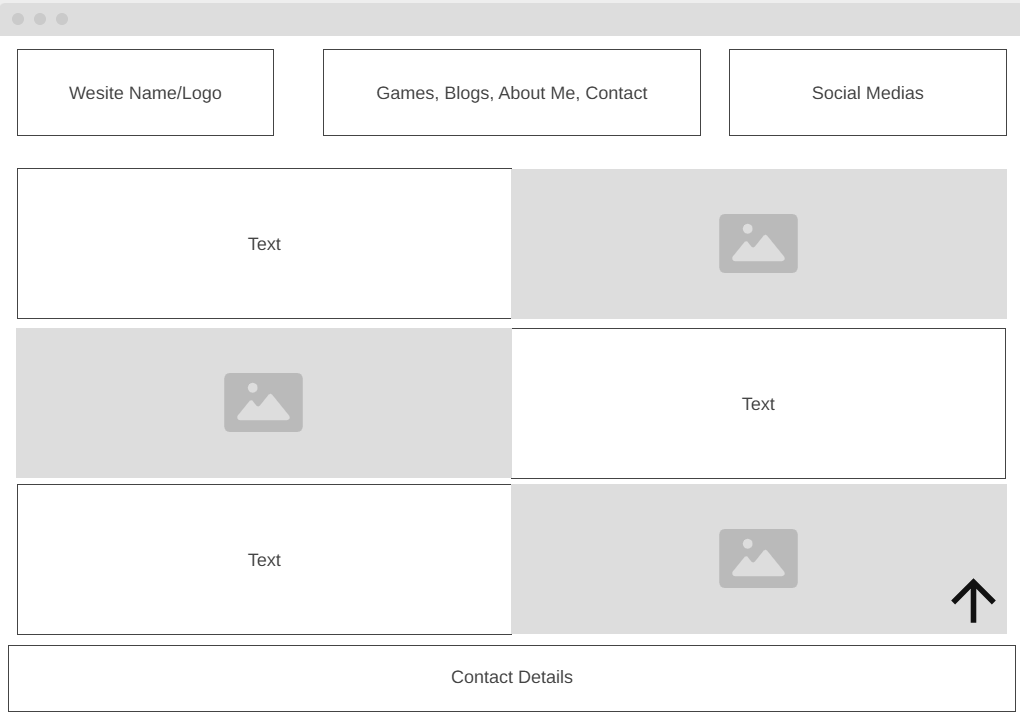
Since my website will be CV/portfolio-based, I want it to be simple but engaging. I'm placing my name or logo at the top, followed by buttons linking to key areas: my game development portfolio, blog, about me page, and contact section. To the right, I'll include links to my relevant social media profiles. One of the things I admire in the websites that inspired me, like Josh Comeau's, Brittany Chiang's, and Adham Dannaway's, is their ability to present a lot of information without overwhelming the user. These sites include so much content, but through clever use of layout, animations, and static vs. dynamic elements, they make it incredibly easy to navigate. I particularly love how static images are placed in the background while text smoothly animates in as the user scrolls. It gives a sense of movement and engagement without feeling overdone. I also plan to include a floating button that allows users to quickly return to the top of the page—something I've found very helpful on other sites.
What Interaction Means To Me
For me, interaction on the web isn't just about flashy animations or dynamic pages—it's about accessibility. The ability to interact with a website means little if people with disabilities or other limitations cannot access it. I've been thinking a lot about how different people experience the web. Someone who is blind, deaf, or has physical disabilities may struggle to navigate a poorly designed website. Even age restrictions play a role. A child trying to access certain educational resources might be blocked due to arbitrary rules, while older adults unfamiliar with modern web design may struggle with overly complicated interfaces. These are all factors I need to consider while building my site—ensuring that my content is accessible to as many users as possible.
Final Thoughts
Moulthrop's essay made me realize how much control we've given up in the digital space. The web was supposed to be a place where information was freely , yet we've accepted an ecosystem where corporations control our interactions, visibility, and access. While I can't change the entire internet, I can at least make sure my small part of it remains as open, accessible, and user-driven as possible. I also want to make my website a true reflection of me, not just another page lost in the sea of corporate-controlled content. Maybe that's the first step in pushing back against the systems that have taken over. But I don't know if that's just me.
References:
- Moulthrop, S. (2003) 'You Say You Want a Revolution? Hypertext and the Laws of Media (1991)', The New Media Reader. Cambridge, Mass: The MIT Press.
- Josh Comeau (n.d.). 'Josh W. Comeau'. Available at: JoshWComeau (Accessed: 21 February 2025).
- Brittany Chiang (n.d.). 'Brittany Chiang Portfolio'. Available at: BrittanyChiang (Accessed: 21 February 2025).
- Adham Dannaway (n.d.). 'Learn UI Design'. Available at:AdhamDannaway (Accessed: 21 February 2025).